
What’s the Minimum QR Code Print Size? (And Why 1” x 1” Is the Standard)
- May 15, 2026
QR codes are one of the easiest ways to connect printed materials to digital experiences. Whether they are used on custom stickers, packaging, product labels, event signage, or inserts, they can instantly send customers to a website, menu, social media page, discount code, or product guide with a simple scan.
But for QR codes to actually work, one detail matters more than most people realize: print size.
One of the most common mistakes businesses make is printing QR codes too small. A QR code might look sharp on a screen or in a proof, but if it is reduced too much in print, it can become difficult—or even impossible—for phones to scan reliably.
So what is the minimum size a QR code should be printed?
The Short Answer: 1” x 1” Is the Minimum Recommended Size
As a general rule, the minimum recommended print size for a QR code is 1 inch by 1 inch.
That size gives most smartphones enough detail to read the code clearly and scan it without frustration.
Can some QR codes scan smaller than that? Sometimes, yes. But once you go below 1” x 1”, scan performance becomes much less reliable. Printed squares can blur together, recognition may slow down, and some phones may struggle to read the code consistently.
If your goal is a QR code that works quickly and reliably, 1” x 1” is the safest starting point.
Why QR Codes Stop Working When They’re Too Small
QR codes may look simple, but they rely on extremely precise printed detail.
Each QR code is made up of a grid of tiny black and white squares. Those squares store information, and a phone camera needs to distinguish them clearly in order to scan the code successfully.
When a QR code is printed too small, several problems can happen. Ink spread may reduce clarity, fine details can begin blending together, and lower-resolution printing may distort the pattern enough to interfere with scanning.
This becomes even more important when the QR code contains more information, because more data usually means a denser and more complex code structure.
So while shrinking a QR code might save space on a sticker or label, it can also make the code far less reliable in the real world.
Why 1” x 1” Works So Well
The reason 1” x 1” has become the standard minimum is because it creates a strong balance between space efficiency and scan reliability.
At that size, most QR codes remain large enough for phone cameras to recognize easily while still fitting comfortably on things like stickers, labels, packaging, and insert cards.
For many common uses, including custom stickers, product packaging, thank-you cards, business cards, and promotional inserts, 1” x 1” works extremely well when the code is designed and printed properly.
How Far Away Will a QR Code Scan?
A helpful rule of thumb is this:
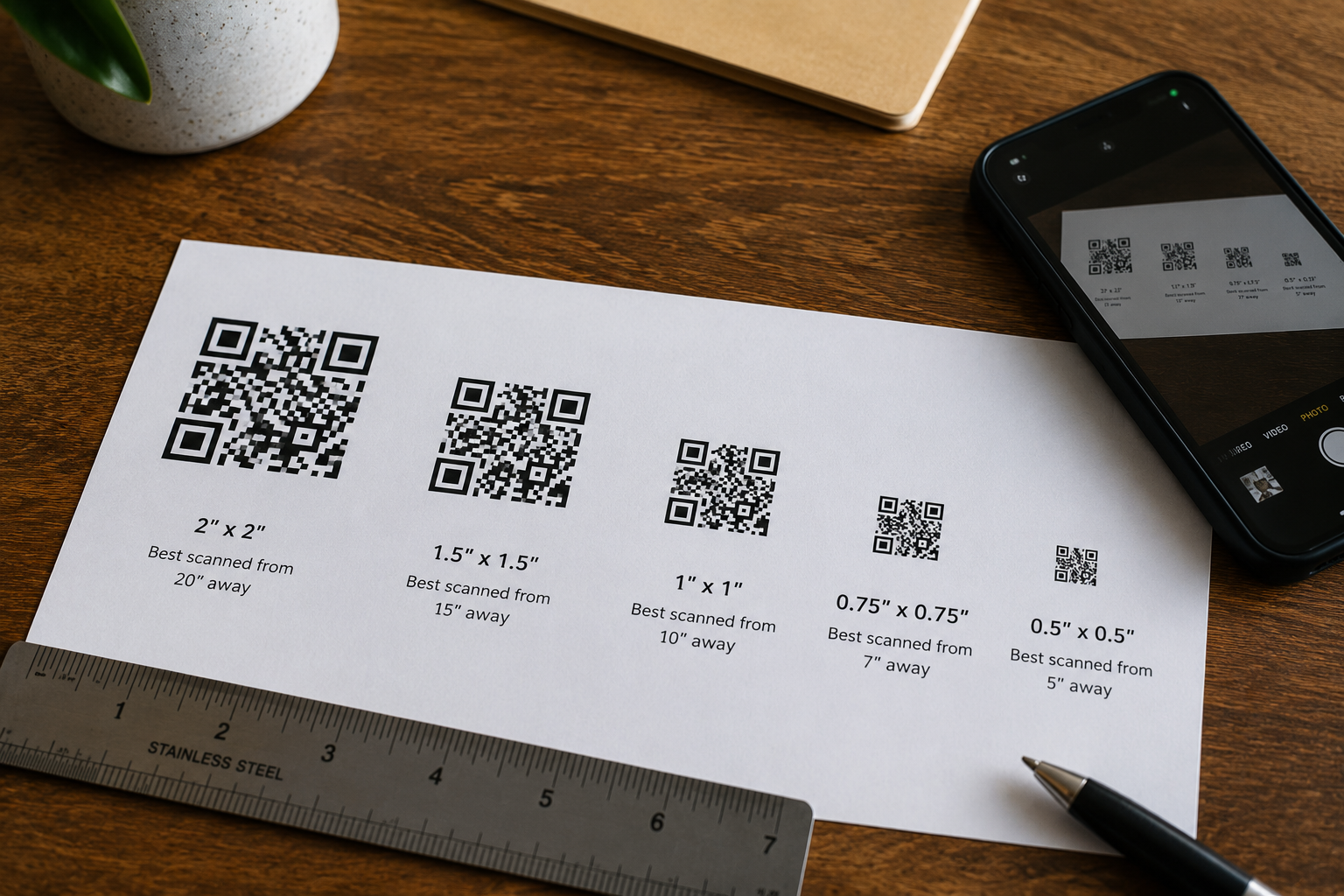
Scanning distance should be about 10 times the width of the QR code
That means:
- a 1-inch QR code is best scanned from about 10 inches away
- a 2-inch QR code works better from around 20 inches away
- a 3-inch QR code can typically scan from around 30 inches away
This is why smaller QR codes work well for items people hold in their hands, while larger QR codes are better for signage, displays, windows, or anything meant to be scanned from farther away.
If someone will be scanning your code from a distance, increasing the size usually improves performance significantly.
When You Should Print a QR Code Bigger Than 1” x 1”
While 1” x 1” is the recommended minimum, it is not always the ideal size.
In many situations, going slightly larger improves usability and reduces the chance of scanning issues.
For example, larger QR codes are often a better choice when:
- the code contains a long or complex URL
- the material has texture or specialty finishes
- the sticker may become scratched or worn
- lighting conditions may not be ideal
- customers will scan from farther away
- the code is being used on vehicles, windows, or signage
In general, if you have extra space available, using a slightly larger QR code usually creates a better customer experience.
A code that scans instantly feels much more polished than one that requires multiple attempts.
QR Code Complexity Also Affects Size
Not all QR codes are equally simple.
A QR code that links to a short, clean URL is usually less dense and easier to scan than one that contains a long link or a large amount of encoded information.
This matters because more complex QR codes contain more tiny squares, which means they need more physical space to remain clear when printed.
For example, a short branded URL may scan perfectly at 1” x 1”, while a longer URL with tracking parameters might need to be printed larger for reliable performance.
That is why QR code performance is not only about dimensions—it is also about what the code is actually encoding.
Whenever possible, shorter URLs generally produce cleaner and more reliable QR codes.
Design Tips for Better QR Code Scanning
Even the right size QR code can fail if it is designed poorly.
If you want your QR code to scan quickly and consistently, a few design best practices make a major difference.
Use High Contrast
Black on white is still the most reliable option. Strong contrast makes it much easier for cameras to detect the pattern quickly.
Leave a Quiet Zone
Every QR code should have blank space surrounding it. This margin, often called a “quiet zone,” helps phones recognize where the code begins and ends.
Print at High Resolution
QR codes should be printed at 300 DPI or higher to keep edges crisp and maintain clean detail.
Avoid Over-Designing
Custom colors, logos, and branded QR codes can look great, but pushing the design too far can interfere with scan performance.
Test Before Printing in Bulk
This is one of the most important steps.
Always print and test your QR code at actual size before placing a large order. A quick test can help catch issues before hundreds or thousands of pieces are printed.
Why Material and Print Quality Matter
A QR code that works perfectly on a digital proof does not always behave the same way once it is physically printed.
Material choice and print quality can affect scan reliability more than many people expect.
For example, textured materials can interrupt clean edge definition, glossy reflections may create glare, and lower-quality printing can soften important details.
That is why QR code stickers should always be printed on quality materials using sharp, high-resolution production methods.
If a QR code is meant to represent your brand or drive customer interaction, it is worth making sure it performs as well in real life as it does on screen.
Why QR Codes Work So Well on Stickers
QR codes and custom stickers are an especially effective combination because they turn a static printed product into something interactive.
A sticker can live on packaging, products, windows, displays, handouts, or promotional materials—but once it includes a QR code, it also becomes a direct gateway to something digital.
Businesses commonly use QR code stickers to connect customers to:
- online stores
- menus
- product instructions
- review pages
- promotions
- social media
- event registration pages
- loyalty programs
This allows stickers to become more than just decoration or branding. They become part of the customer experience itself.
Used well, QR code stickers create a seamless connection between physical products and online engagement.
Common Places QR Code Stickers Are Used
Because they are compact and versatile, QR code stickers work well across many different industries and applications.
They are commonly used on:
- product packaging
- restaurant takeout containers
- storefront windows
- trade show materials
- thank-you cards
- retail displays
- promotional handouts
Their flexibility is one of the biggest reasons QR code stickers have become so popular. They are affordable, functional, easy to distribute, and highly effective when designed properly.
Final Takeaway: 1” x 1” Is the Minimum—But Bigger Is Often Better
If you want your QR code to scan reliably, 1” x 1” is the minimum size you should generally aim for.
That size works well for many common applications and gives most smartphones enough detail to scan the code without issue.
However, if you have the space available, going slightly larger is often the safer and more user-friendly option—especially for complex codes, specialty materials, or long-distance scanning.
A QR code should not just look good in the design. It should work effortlessly in the real world.
Because if it does not scan, it does not do its job.
Need Help Printing QR Code Stickers That Actually Work?
At Sticker Genius, we help customers create custom stickers that do more than just look good—they are built to perform.
If you are adding QR codes to your stickers, labels, or packaging, choosing the right size, material, and print quality can make all the difference.
Free Shipping
All U.S. orders over $99 receive free shipping (Excluding Hawaii and Alaska). Expedited shipping options available.
No Minimum
Yes, that's correct. We will print any size order you need. Order quantity 1 or 1,000,000
Fast Turnaround
Standard turn around ships within a week. Request rush production for faster turnaround.
Made in the USA
All stickers proudly produced in The Genius Lab by our "Stickologist" just north of Detroit.